Wallet Address Smart Redirect
When you think of a wallet address, you probably think of a string of characters (or in Open Payments’s case, a neat URL) that acts as a source or destination for payments. For example:
https://ilp.interledger.cards/007
Traditionally, when an Open Payments client queries that address, it receives a structured JSON:
{ "id": "https://ilp.interledger.cards/007", "publicName": "John Doe", "assetCode": "EUR", "assetScale": 2, "authServer": "https://auth.interledger.cards", "resourceServer": "https://ilp.interledger.cards"}This is perfect for developers and systems that need machine-readable data. But what about people?
If someone clicks that same wallet address in a browser, JSON isn’t exactly a friendly experience. That’s where our new Wallet Address Smart Redirect comes in.
What’s new?
As of v1.1.2-beta, enabling Smart Redirect, Rafiki detects when a request is coming from a browser (using the Accept: text/html header). Instead of showing raw JSON, the request automatically redirects to a user-friendly payment page defined in your environment settings.
For example, when opened in a browser, https://ilp.interledger.cards/007 redirects to:
https://interledgerpay.com/payment-choice?receiver=https://ilp.interledger.cards/007
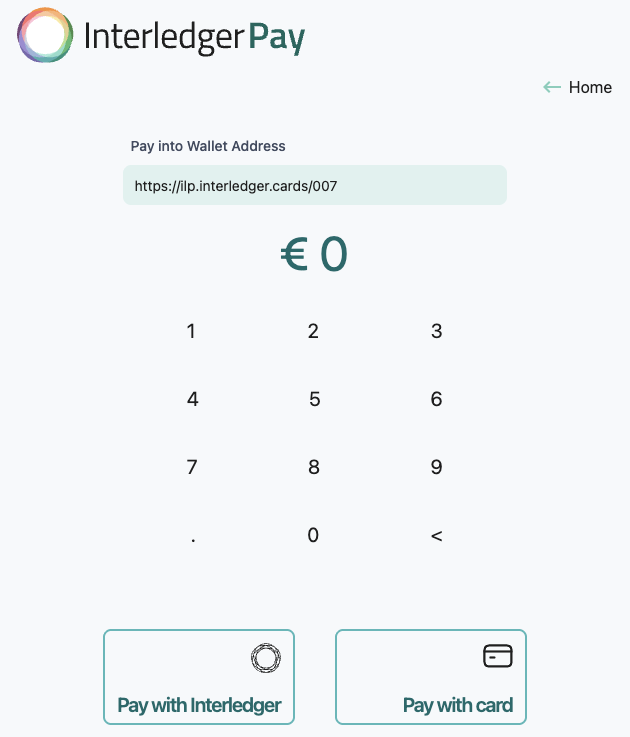
The result: a single wallet address that works seamlessly for both developers and end-users.
Example in Action
Let’s say Alice wants to send money to Bob.
- Bob shares his wallet address:
https://ilp.interledger.cards/007 - Alice pastes that link into her browser.
- Instead of confusing JSON, Alice is redirected straight to Bob’s payment page (configured by the wallet operator).
- Alice chooses her payment method and completes the transfer.
Meanwhile, behind the scenes:
- If Alice’s wallet operator queried Bob’s wallet address directly, it would still get the standard JSON response.
- One address, two different but perfectly matched experiences.
Why it matters
- One address, two roles: The same URL can serve structured data for APIs and a human-friendly payment experience for browsers.
- Frictionless payments: Users who aren’t developers don’t have to stare at JSON—they land on a simple payment page.
- Configurable: You control where browser requests are redirected by setting the URL in your environment variable.
Configuration
Enable Wallet Address Smart Redirect by setting a single environment variable:
WALLET_ADDRESS_REDIRECT_HTML_PAGE="https://interledgerpay.com/payment-choice?receiver=%ewa"Header behavior
- If the request has
Acceptheader withtext/html, Rafiki redirects to the URL fromWALLET_ADDRESS_REDIRECT_HTML_PAGE(after substituting tokens below). - Otherwise, Rafiki returns the standard JSON response (no redirect).
URL tokens (drop-in placeholders)
You can compose the redirect URL using these tokens:
| Token | What it inserts | Example redirect template | Example resolved URL (for http://ilp.dev/007) |
|---|---|---|---|
%wa | Full wallet address including scheme | http://rafiki.dev/%wa | http://rafiki.dev/http://ilp.dev/007 |
%ewa | URI-encoded full wallet address | http://rafiki.dev/?wallet=%ewa | http://rafiki.dev/?wallet=http%3A%2F%2Filp.dev%2F007 |
%wp | Host + path (no scheme) | http://rafiki.dev/%wp | http://rafiki.dev/ilp.dev/007 |
%ewp | URI-encoded host + path (no scheme) | http://rafiki.dev/?wallet=%ewp | http://rafiki.dev/?wallet=ilp.dev%2F007 |
How to use it
- Set
WALLET_ADDRESS_REDIRECT_HTML_PAGEin yourbackendenvironment variables. - Choose the right token for your redirect style.
- That’s it, your wallet addresses now double as developer endpoints and payment links.
Looking ahead
Wallet Address Smart Redirect is another step toward making Rafiki wallets more accessible, discoverable, and user-friendly. Whether you’re a developer integrating APIs or a user just trying to send money, one address now does it all.